Arab Press

بالشعب و للشعب
Saturday, Feb 21, 2026

How to fix AirDrop connection issues on iPhone, iPad, or Mac

How to fix AirDrop connection issues on iPhone, iPad, or Mac

If your AirDrop is not working on an iPhone, iPad, or Mac, first make sure that Bluetooth is turned on on both devices.

One of the most convenient features for Apple users is AirDrop, which lets you send media, links, and documents via Bluetooth or Wi-Fi to devices within a certain range.

Most newer Apple devices already have this feature, however, it can be finicky for no particular reason. When AirDrop is not working properly, try these troubleshooting techniques.

Quick tip: AirDrop is compatible with any iPhone that has iOS 7 or later, iPad with iPadOS 13 or later, and Mac with OS X 10.10. Both devices must be compatible for AirDrop to work.

How AirDrop works

to discover devices within a certain range, and then Wi-Fi to send over the content.

Bluetooth connections can reach up to half a mile, but your devices likely need to be within 30 feet of each other to work properly. When Wi-Fi is unavailable, AirDrop will use your cellular service.

How to fix AirDrop not working on iPhone or iPad


First, make sure your iPhone or iPad has Bluetooth turned on. To do that, open the Settings app on your device. Tap Bluetooth toward the top of the list and make sure the button is green — if not, swipe the button to the right. If you see a prompt to Allow New Connections, tap on it to allow your device to connect to new devices.
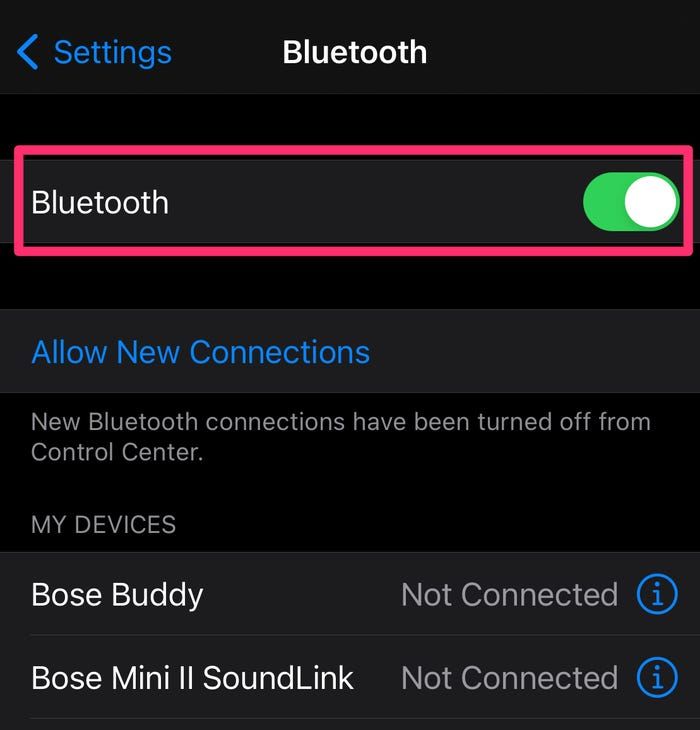
Swipe the Bluetooth button to the right to turn it green, and tap "Allow New Connections" to connect to new devices.


Next, make sure AirDrop is turned on. In the Settings app, select General and then tap AirDrop. You can then select if you want AirDrop to be available to everyone within range or just those in your contact list. For the sake of haste, choose Everyone to see if that quickly solves the problem. It also doesn't hurt to try turning AirDrop off and on again for it to reconnect — to turn it off, select Receiving Off.
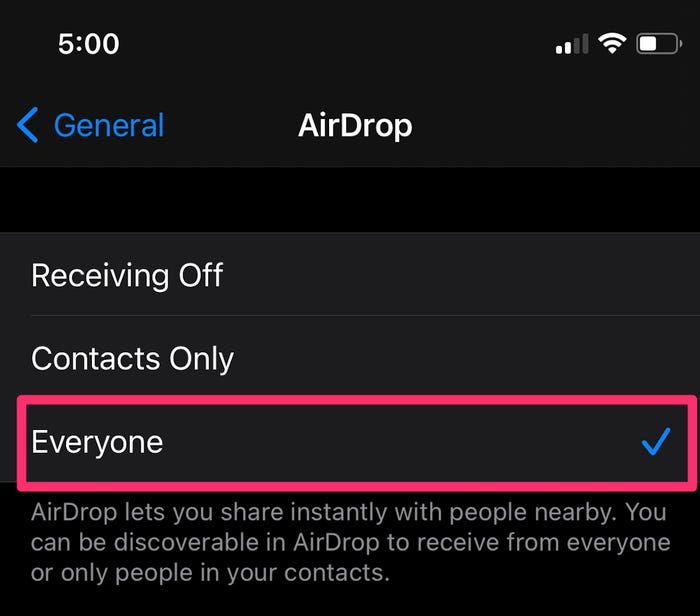
On the AirDrop page, select "Everyone."


Finally, make sure the device you want to AirDrop to is also enabled for Everyone. If your two devices are far apart, bring them closer in case they're slightly out of range.

How to fix AirDrop not working on a Mac computer


You may need to change your AirDrop settings to allow your device to be discoverable. Open the Finder app from your Mac's menu bar or search for it using Spotlight. In Finder, select AirDrop at the top of the sidebar menu on the left. At the bottom of the AirDrop page, select the drop-down menu next to Allow me to be discovered by and change it to Everyone.
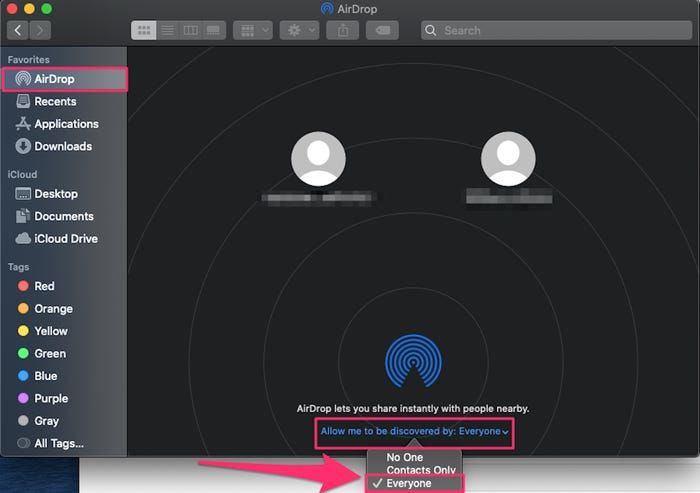
In the drop-down, select "Everyone."


If that doesn't work, use the menu bar at the top of your screen and select the Wi-Fi icon. Make sure it's switched on and that you're connected to a network. Next, do the same for Bluetooth. You can also try turning both off and on again in an attempt to reconnect.

You should also check that your firewall settings allow for new connections. Open the System Preferences app on your Mac, and select Security & Privacy. On the Security & Privacy page, click the lock icon in the bottom-left corner of the screen, and enter your password or use your Touch ID.

On the Firewall tab, you can either click Turn Off Firewall or click Firewall Options and, in the pop-up, uncheck the box next to Block all incoming connections, then click OK.
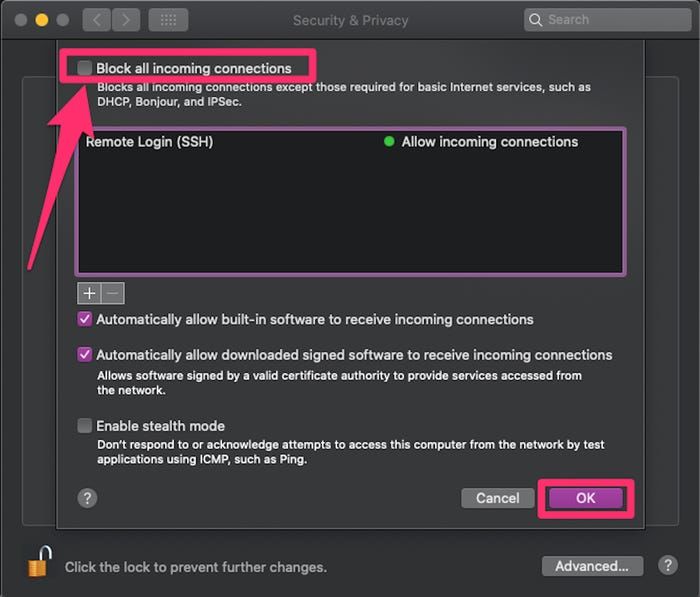
After clicking "Firewall Options," make sure to uncheck the box next to "Block all incoming connections," and click "OK."


What to do if AirDrop still isn't working


If AirDrop is still not working after you've tried the above steps, consider restarting your iPhone, iPad, or Mac.

You may also want to update your iPhone, iPad, or Mac software to the latest available version if you haven't already.

Newsletter

Related Articles

Arab Press
0:00
0:00
Close
OpenAI CEO Sam Altman praises the rapid progress of Chinese tech companies.
Concerns Mount Over Potential Saudi Uranium Enrichment in Prospective US Nuclear Accord
Trump Directs Government to Release UFO and Alien Information
Trump Signs Global 10% Tariffs on Imports
Investability Emerges as the Defining Test of Saudi Arabia’s Next Market Phase
Saudi Arabia’s Packaging Market Accelerates as Sustainability and E-Commerce Drive Transformation
Saudi Arabia Unveils $32 Billion Push Into Theme Parks and Global Entertainment
Saudi Crude Exports to India Climb Sharply, Closing Gap With Russia
Saudi Arabia’s Halal Cosmetics Market Expands as Faith and Ethical Beauty Drive Growth
ImmunityBio Secures Saudi Partnerships to Launch Flagship Cancer Therapy
United Kingdom Denies U.S. Access to Military Base for Potential Iran Strike
Türkiye and Saudi Arabia Launch Expanded Renewable Energy Partnership
US Supreme Court Voids Trump’s Emergency Tariff Plan, Reshaping Trade Power and Fiscal Risk
Mongolian Mining Family’s HK$247 Million Stanley Home Purchase Highlights Resilient Luxury Market
UK Intensifies Efforts to Secure Saudi Investment in Next-Generation Fighter Jet Programme
Saudi Arabia Tops Middle East Green Building Rankings with Record Growth in 2025
Qatar and Saudi Arabia Each Commit One Billion Dollars to President Trump’s ‘Board of Peace’ Initiative
Ramadan 2026 Prayer Times Set as Fasting Begins in Saudi Arabia and Egypt Announces Dates
Saudi Arabia Launches Ramadan 2026 Hotel Campaign to Boost Religious and Leisure Tourism
Saudi Arabia Seeks Reroute of Greece-Bound Fibre-Optic Cable Through Syria Instead of Israel
Saudi-Backed Scopely Acquires Majority Stake in Turkey’s Loom Games to Expand Mobile Portfolio
Zodiac Milpro Launches Zid Marine Joint Venture in Saudi Arabia to Expand Regional Shipbuilding
Saudi Arabia Reaffirms Reform Path Amid Claims of Ideological Reversal
Calls Grow for Saudi Arabia and UAE to Settle Differences Through Direct Dialogue
Jensen Huang just told the story of how Elon Musk became NVIDIA’s very first customer for their powerful AI supercomputer
British couple sentenced to 10 years in Iran for espionage
Former British Prince Andrew Arrested on Suspicion of Misconduct in Public Office
Unitree Robotics founder Wang Xingxing showcases future robot deployment during Spring Festival Gala.
Prince William Holds Talks with Crown Prince Mohammed bin Salman During Saudi Visit
Saudi Arabia’s Humain Commits $3 Billion Investment to Elon Musk’s xAI
SCOPA Executive Unveils Ambitious Relaunch Strategy for Saudi Production Company
Saudi Arabia Sees Rise in Business Visa Rejections Amid Tighter Compliance Checks
Saudi PIF Transfers Take-Two Stake to Savvy Games Group in Strategic Gaming Push
Jimmy Carr Says He ‘Loved’ Saudi Arabia Show Amid Debate Over Performing in the Kingdom
Sotheby’s ‘Origins II’ Auction Signals Saudi Collectors’ Shift Toward Cultural Legacy
EY and Microsoft Deepen Saudi Arabia Partnership with Launch of EY Studio+
Google Pay Launches Support for Mastercard Cards in Saudi Arabia
Saudi Arabia Bolsters Maritime Surveillance Fleet with Four C-27J Patrol Aircraft
Kazakhstan and Saudi Arabia Deepen Strategic Partnership with New Investment and Energy Agreements
Saudi Crown Prince Receives Written Message from Kazakhstan’s President Amid Expanding Strategic Ties
ImmunityBio Shares Rise After Saudi Arabia BCG Manufacturing Update Spurs Investor Optimism
Global Music Star Tyla Confirmed as Headliner at 2026 Saudi Arabian Grand Prix Entertainment Lineup
Somalia and Saudi Arabia Forge New Military Partnership Amid Regional Power Shifts
Saudi Arabia and Several Nations Criticize Israeli West Bank Land Measures as Diplomatic Tensions Rise
Saudi Public Investment Fund Transfers Stake in Take-Two Interactive as Portfolio Strategy Evolves
Saudi Arabia’s Flagship Defense Expo Highlights Industrial Ambitions and Expanding Arms Portfolio
Strategic Divergence Deepens as Saudi Arabia and UAE Recalibrate Gulf Partnership
Saudi Arabia Confirms Start of Ramadan as Crescent Moon Sighted, While Other Nations Begin a Day Later
Rubio Calls for Sweeping U.N. Reform, Saying It Has Failed to End Wars in Gaza and Ukraine
10,000 Condoms Distributed at Winter Olympics 2026 Athlete Village Depleted Within 72 Hours
×